1
Where visibility drops
Show the streets and neighborhoods where the business falls out of view.
Run the familiar Google Maps scan, publish an agency-branded report a business owner can understand, see when it is opened, and keep the same baseline for scheduled reporting if they sign.
100 free credits · No card · No migration · Founder-assisted first setup
Already use Local Falcon, BrightLocal, or another tracker? Compare the workflow on one prospect without moving your client roster.
Real Maps grid
Point-by-point local visibility
Buyer-ready report
Agency brand and editable story
Same baseline
Scheduled progress if they sign
Agency-branded prospect report
Live URL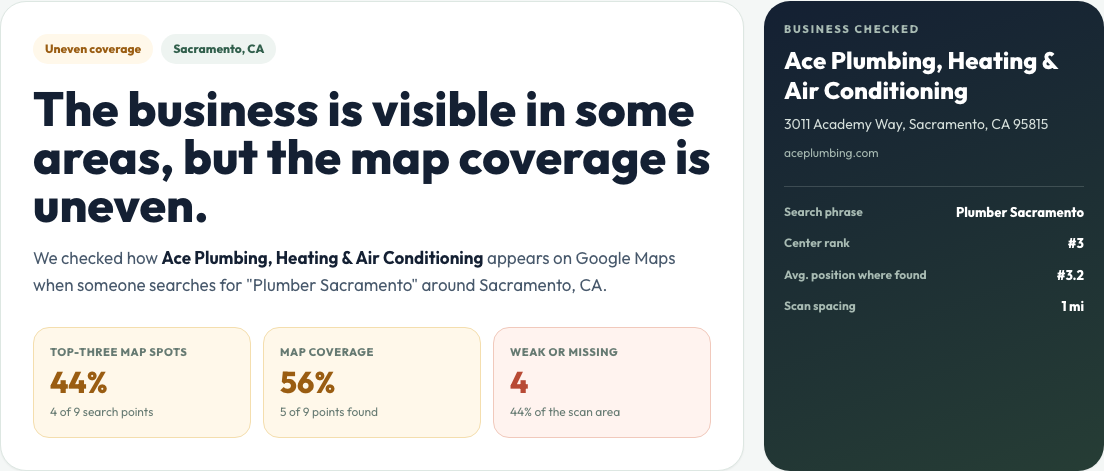
Local grid evidence
5 x 5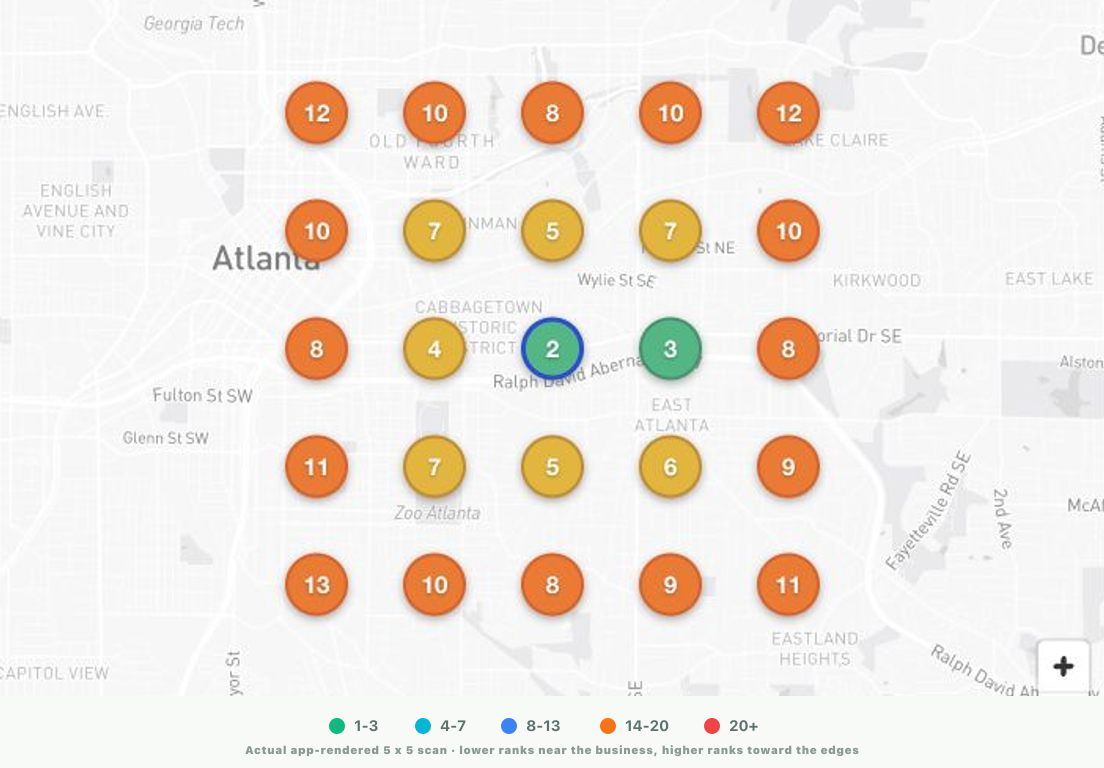
Start with one real prospect
Find the gap
Run the real point-by-point Maps scan.
Send the proof
Publish a branded report an owner can follow.
See activity
Record first opens and repeat visits.
Continue
Keep the first scan as the client baseline.
Prospect reports
Publish one grid scan as a branded report your agency can send in outreach, a sales follow-up, or a proposal. Explain the evidence in plain language, edit the recommended next steps, and see when the report is opened or revisited.
Show the streets and neighborhoods where the business falls out of view.
Name the competitors replacing the prospect across weak grid points.
Translate ranking evidence into a short, buyer-facing explanation.
Add agency-editable recommendations and a contextual call to action.
See the exact report an agency can send before a sales call.
Agency-branded prospect report
Live URL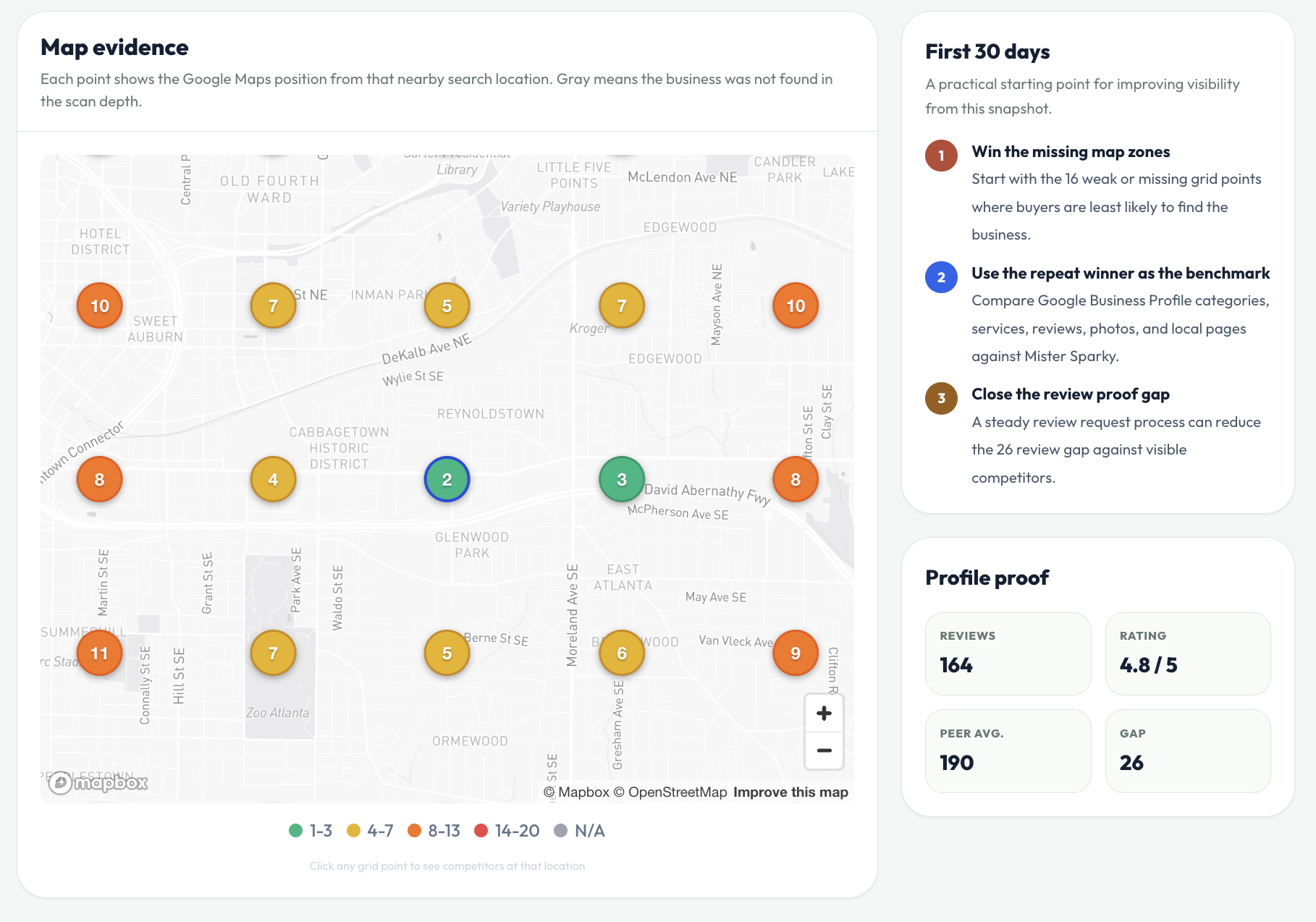
Local grid scan
5 x 5 · 1 miThe familiar starting point
Choose a business, keyword, grid size, and spacing. SearchGrid Pro records point-by-point Google Maps rankings, competitor context, and scan history—the core evidence agencies already know how to use.
Scan by business, address, or Place ID.
Run on demand for a sales conversation or schedule lower-cost ongoing scans.
Client progress
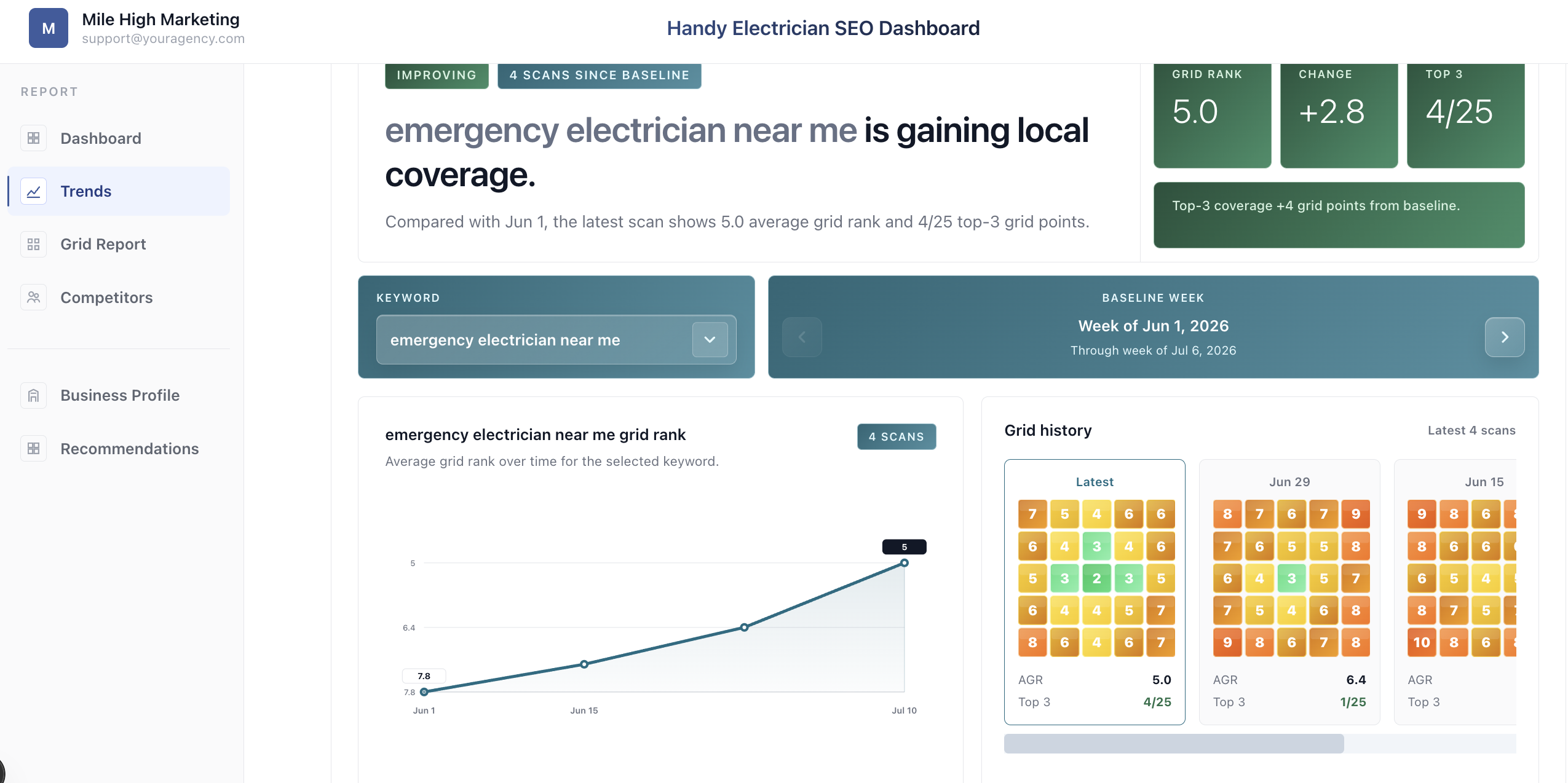
Keep the prospect's business, keywords, and first grid as the starting point. Add scheduled scans and give the client a concise branded view of what changed, where the opportunity remains, and what happens next.
Preserve the first scan as the before-work baseline.
Show meaningful changes, history, and remaining gaps.
Send a simple progress view while deeper detail stays available.
See how the original scan continues after the close.
Client progress view
Focused by design
SearchGrid Pro covers the core geo-grid and reporting workflow without pretending to be an all-in-one local SEO platform.
Google Maps geo-grid scans
Custom grid sizes and spacing
Multiple keywords and locations
Competitor visibility
Scheduled scans and history
Scan-to-scan comparisons
Agency-branded report links
PDF and grid image exports
Bulk prospect import
Client progress handoff
Not bundled
Citation distribution
Not bundled
GBP post management
Not bundled
Review-request campaigns
Agency pricing
Pick the scan capacity that fits your agency today. Scheduled scans run at half price—0.5 credit per grid point—so every plan goes twice as far for recurring reports. Every paid plan includes the complete prospect-to-progress workflow, with no limits on report URLs or client progress views.
Solo
2,000 credits each month
For solo operators testing a focused prospecting motion.
Starter
5,000 credits each month
For small agencies scanning prospects and a growing client roster.
Growth
15,000 credits each month
For agencies running regular prospect batches and client reporting.
Pro
30,000 credits each month
For established teams scanning across larger client portfolios.
Included on every paid plan
Plans change scan capacity and add-on pricing, not the agency workflow.
First scan
Keep the business, keyword, grid settings, competitors, and initial result together.
Prospect delivery
Share a live report, PDF, or grid image with the agency’s message and call to action.
Follow-up
Record first opens and repeat visits so the agency can time its own follow-up.
Client progress
Continue with scheduled scans, history, and a branded progress view without rebuilding the account.
Agency questions
Straight answers about map grids, agency reporting, scan credits, and what happens after a prospect becomes a client.
A geo-grid checks where a business appears in Google Maps for one keyword from multiple points around a target area. The color-coded map shows how visibility changes from one neighborhood or street to the next.
It is a Google Maps geo-grid rank tracker designed around the way agencies present and report local SEO. Run the scans and track rankings you expect, then turn that evidence into branded prospect reports, report-view signals, scheduled reporting, and client progress views.
No. Start by using SearchGrid Pro alongside your current stack for one live prospect. If the workflow fits, you can keep using it for prospecting, move recurring client scans over gradually, or use it as your primary agency grid tracker.
Google Maps results change with the searcher’s exact location, the time of the search, and personalized browser context. A grid scan checks each mapped coordinate consistently, giving you a repeatable local-visibility snapshot instead of one search from one device.
No. SearchGrid Pro scans public Google Maps results. Find a business by name and city, or use its Google Business Profile URL or Place ID; no Google account connection is required.
Yes, as long as the business has a public Google Maps profile. Use the exact Google Business Profile URL or Place ID to identify the listing when its street address is hidden.
Yes. Choose the grid size and spacing that match the market you are investigating. A tighter grid gives street-level detail, while wider spacing shows visibility across a larger service area.
Each enabled on-demand grid point costs one credit per keyword, so a 5×5 scan uses 25 credits. Scheduled scans cost half as much: the same 5×5 scan uses 12.5 credits per keyword.
Yes. Track multiple keywords for each business and manage multiple prospect or client locations in the same agency workspace. Credits are used for each keyword and enabled grid point scanned.
Yes. Each point records the businesses appearing around the target listing, so you can see who outranks it in weak areas and carry that competitor context into the prospect report.
Yes. Create recurring scan schedules for client locations and keep the results in scan history. The client progress view uses that history to show keyword movement, visibility trends, and changes between scans.
No. Send the shareable report URL directly from your email or CRM. You can also download a PDF or export the grid image for a proposal, presentation, or follow-up.
Yes. Add your agency branding to buyer-facing prospect reports and client progress views. Prospect reports also support configurable sections, share links, PDFs, and grid image exports.
Import lists using business name and city, Google Place ID, or Google Business Profile URL. Email and website fields are optional, so you can start with the market list you already have.
Convert the saved prospect into a client without rebuilding the location. Its business details and first scan carry into the client workflow, where you can add schedules and publish a branded progress view.
No. Every paid plan includes unlimited prospect report URLs and unlimited client progress views. Plans scale by scan credits rather than the number of businesses receiving reports.
Yes. Every new account receives 100 one-time credits with no credit card required, enough to run a real sample scan and review the prospect-report workflow.
Plans are billed monthly. You can buy extra credits at your plan’s displayed add-on rate, and plan plus add-on credits reset at renewal. Use the billing portal on the Credits page to manage invoices or cancel.
Founding beta
Bring a public business and keyword. Run the grid, review the branded prospect report, and decide whether it is something your agency would actually send.
100 free credits · No card · Founder-assisted first setup